---
title: Connecting a calendar to online scheduling [B12 2.0]
description: How to connect and synchronize your calendar to the online scheduling tool
---
[Skip to content](https://support.b12.io/en/v2/connecting-a-calendar-to-online-scheduling#main-content)

- [Help Center](https://support.b12.io/)
- [B12 Website](https://www.b12.io/)
- [AI Website Prompts](https://www.b12.io/ai-website-prompt-gallery)
- [Resources](https://www.b12.io/resource-center/)
- [Pricing](https://www.b12.io/pricing/)
- [Log in](https://b12.io/dashboard/)
Open main navigation
Close main navigation
- [Help Center](https://support.b12.io/)
- [B12 Website](https://www.b12.io/)
- [AI Website Prompts](https://www.b12.io/ai-website-prompt-gallery)
- [Resources](https://www.b12.io/resource-center/)
- [Pricing](https://www.b12.io/pricing/)
- [Log in](https://b12.io/dashboard/)
- [Start for free](https://b12.io/signup/)
[Start for free](https://b12.io/signup/)
How can we help?
- There are no suggestions because the search field is empty.
1. [B12 Help Center](https://support.b12.io/en?hsLang=en)
2. [B12 2.0](https://support.b12.io/en/b12-2-0?hsLang=en)
3. [Online Scheduling](https://support.b12.io/en/b12-2-0?hsLang=en#online-scheduling)
# Connecting a calendar to online scheduling \[B12 2.0\]
## Learn how to connect and synchronize your calendar to the online scheduling tool.
|  Written by: Madeline B. Last updated: 24 Oct., 2025 | |
| --- | --- |
Adding online scheduling to your website can be quick and easy, and provides your clients the ease and efficiency of scheduling an appointment directly from your website.
All B12 customers can connect a calendar and use scheduling. However, your plan determines how many calendars and appointment types you can use:
- Without **Client Engagement**:
- 1 appointment type
- 1 connected calendar
- Scheduling available with 1 team member
- With **Client Engagement**:
- Multiple appointment types
- Multiple connected calendars
- Scheduling for multiple team members - each user must have their own seat
Learn more about [Client Engagement seats](https://support.b12.io/en/client-engagement-and-seats?hsLang=en) and [upgrading your plan](https://support.b12.io/en/b12-website-subscription-plans-and-pricing?hsLang=en).
### Connecting your calendar
1\. In the left sidebar menu, select **`Scheduling`**.
2\. Under **Connect your calendar**, click `Get started`.
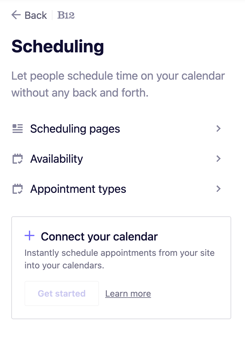
3\. Click **`Connect`**.
4\. Select your calendar provider from the list to connect (powered by Cronofy):
- iCloud
- Google
- Office 365
- Exchange
- Outlook.com
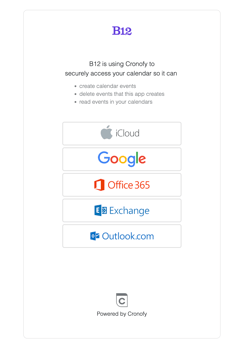
5\. When prompted, select the **I agree…** checkbox, then click `Link Account`.
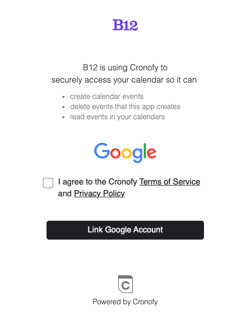
**Note:** We'll be using Google as an example for the next few steps; your provider may look a little different but will follow the same basic steps.
6\. Select the account associated with the calendar you'd like to connect and select `Continue`.
7\. Check the checkbox for **See, edit, share…**, then click `Continue`.
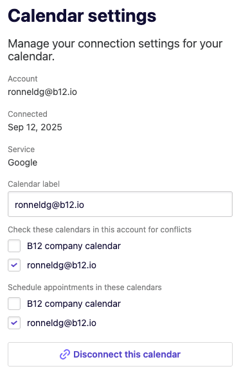
8\. Your calendar will now display as connected. From here, choose which calendars you want to check for conflicts and use for scheduling appointments.
### Managing connected calendars
- To disconnect a calendar, click `Disconnect this calendar`at the bottom of the settings panel.
- To edit a connected calendar, click the calendar name in the list.
- To add an additional calendar, click `Add calendar`and repeat the steps above.
Now your online scheduling forms will reflect your calendar's open slots, ensuring that website visitors or clients can accurately schedule appointments with you.
#### See also:
- [Adding online scheduling to your website](https://support.b12.io/en/articles/2566306-adding-online-scheduling-to-your-website?hsLang=en)
- [Getting started](https://support.b12.io/en/getting-started?hsLang=en#main-content)
- [Introduction](https://support.b12.io/en/getting-started?hsLang=en#introduction)
- [Detailed guides](https://support.b12.io/en/getting-started?hsLang=en#detailed-guides)
- [Working with B12's AI Agent](https://support.b12.io/en/working-with-b12s-ai-agent?hsLang=en#main-content)
- [Agent Skills](https://support.b12.io/en/working-with-b12s-ai-agent?hsLang=en#agent-skills)
- [Built-in features](https://support.b12.io/en/built-in-features?hsLang=en#main-content)
- [Visual edit](https://support.b12.io/en/built-in-features?hsLang=en#visual-edit)
- [Code editor](https://support.b12.io/en/built-in-features?hsLang=en#code-editor)
- [Data & users (Backends)](https://support.b12.io/en/built-in-features?hsLang=en#data-users-backends)
- [Forms & submissions](https://support.b12.io/en/built-in-features?hsLang=en#forms-submissions)
- [Commerce](https://support.b12.io/en/built-in-features?hsLang=en#commerce)
- [Contact manager](https://support.b12.io/en/built-in-features?hsLang=en#contact-manager)
- [eSignatures](https://support.b12.io/en/built-in-features?hsLang=en#esignatures)
- [Email Marketing](https://support.b12.io/en/built-in-features?hsLang=en#email-marketing)
- [Team](https://support.b12.io/en/built-in-features?hsLang=en#team)
- [Analytics](https://support.b12.io/en/built-in-features?hsLang=en#analytics)
- [Website settings](https://support.b12.io/en/built-in-features?hsLang=en#website-settings)
- [Adding functionality](https://support.b12.io/en/adding-functionality?hsLang=en#main-content)
- [Third-party integrations](https://support.b12.io/en/adding-functionality?hsLang=en#third-party-integrations)
- [Publishing & growing](https://support.b12.io/en/publishing-growing?hsLang=en#main-content)
- [Domains](https://support.b12.io/en/publishing-growing?hsLang=en#domains)
- [Connecting your Domain](https://support.b12.io/en/publishing-growing?hsLang=en#connecting-your-domain)
- [Managing Your Domain](https://support.b12.io/en/publishing-growing?hsLang=en#managing-your-domain)
- [Email Forwarding & Sending](https://support.b12.io/en/publishing-growing?hsLang=en#email-forwarding-sending)
- [Growth & Marketing](https://support.b12.io/en/publishing-growing?hsLang=en#growth-marketing)
- [Troubleshooting](https://support.b12.io/en/troubleshooting?hsLang=en#main-content)
- [FAQs](https://support.b12.io/en/troubleshooting?hsLang=en#faqs)
- [Account & billing](https://support.b12.io/en/account-billing?hsLang=en#main-content)
- [Account Login & Password](https://support.b12.io/en/account-billing?hsLang=en#account-login-password)
- [Subscription & Payment Information](https://support.b12.io/en/account-billing?hsLang=en#subscription-payment-information)
- [Your Account](https://support.b12.io/en/account-billing?hsLang=en#your-account)
- [Managing Multiple Websites](https://support.b12.io/en/account-billing?hsLang=en#managing-multiple-websites)
- [Multi-user](https://support.b12.io/en/account-billing?hsLang=en#multi-user)
- [Getting support](https://support.b12.io/en/getting-support?hsLang=en#main-content)
- [Professional & Advanced Plan Support (B12 2.0)](https://support.b12.io/en/getting-support?hsLang=en#professional-advanced-plan-support-b12-2-0)
- [B12 2.0](https://support.b12.io/en/b12-2-0?hsLang=en#main-content)
- [Website Structure and Content](https://support.b12.io/en/b12-2-0?hsLang=en#website-structure-and-content)
- [Website Style & Design](https://support.b12.io/en/b12-2-0?hsLang=en#website-style-design)
- [Sitewide Settings](https://support.b12.io/en/b12-2-0?hsLang=en#sitewide-settings)
- [Using the B12 Editor](https://support.b12.io/en/b12-2-0?hsLang=en#using-the-b12-editor)
- [Analytics & SEO](https://support.b12.io/en/b12-2-0?hsLang=en#analytics-seo)
- [Integrations - General](https://support.b12.io/en/b12-2-0?hsLang=en#integrations-general)
- [Integrations - Communication](https://support.b12.io/en/b12-2-0?hsLang=en#integrations-communication)
- [Integrations - Language](https://support.b12.io/en/b12-2-0?hsLang=en#integrations-language)
- [Integrations - Ecommerce](https://support.b12.io/en/b12-2-0?hsLang=en#integrations-ecommerce)
- [Professional & Advanced Plan Features](https://support.b12.io/en/b12-2-0?hsLang=en#professional-advanced-plan-features)
- [Troubleshooting & Resources](https://support.b12.io/en/b12-2-0?hsLang=en#troubleshooting-resources)
- [Contact Forms](https://support.b12.io/en/b12-2-0?hsLang=en#contact-forms)
- [Online Scheduling](https://support.b12.io/en/b12-2-0?hsLang=en#online-scheduling)
- [Advanced Editing (Experts Only)](https://support.b12.io/en/b12-2-0?hsLang=en#advanced-editing-experts-only)
[](https://www.b12.io)
© 2025 B12. All rights reserved.
×