---
title: Creating client intake form pages [B12 2.0]
description: Client intake is a crucial process for a business so we want to make sure that the experience is simple and efficient for both you and your prospect. B12’s product includes a contact manager, a simp
---
[Skip to content](https://support.b12.io/en/v2/creating-client-intake-form-pages#main-content)
[](https://support.b12.io/en?hsLang=en)
- [B12 Website](https://www.b12.io/)
- Products
Show submenu for Products
- [AI Builder](https://www.b12.io/ai-website-builder)
- [Templates](https://www.b12.io/ai-website-prompt-gallery)
- [Resources](https://www.b12.io/resource-center)
- [Pricing](https://www.b12.io/pricing)
- [Log in](https://b12.io/dashboard/)
Open main navigation
Close main navigation
- [B12 Website](https://www.b12.io/)
- Products
Show submenu for Products
- [AI Builder](https://www.b12.io/ai-website-builder)
- [Templates](https://www.b12.io/ai-website-prompt-gallery)
- [Resources](https://www.b12.io/resource-center)
- [Pricing](https://www.b12.io/pricing)
- [Log in](https://b12.io/dashboard/)
- [Start for free](https://b12.io/signup/)
[Start for free](https://b12.io/signup/)
How can we help?
- There are no suggestions because the search field is empty.
1. [B12 Help Center](https://support.b12.io/en?hsLang=en)
2. [B12 2.0](https://support.b12.io/en/b12-2-0?hsLang=en)
3. [Contact Forms](https://support.b12.io/en/b12-2-0?hsLang=en#contact-forms)
# Creating client intake form pages \[B12 2.0\]
## Learn how to create client intake form pages.
|  Written by: Meredith Last updated: 25 Dec., 2025 |
| --- |
Client intake is a key part of your business process. B12 makes it easy to create, share, and manage client forms, making the intake experience simple and efficient for both you and your clients.
B12 includes a built-in [contact manager](https://support.b12.io/en/articles/2934439-what-is-the-contact-manager?hsLang=en), a lightweight CRM that keeps all of your prospects and clients in one place. Every form submitted through your website automatically syncs with your contact manager.
If your intake process requires a client or prospect to complete a form, simply share the **intake form page** on your website. Once submitted, the form data will instantly appear in your contact manager.
You can also store **notes from intake calls** directly in your contact manager. This ensures all client details, forms, and notes are organized in one centralized location.
### Creating a client intake form
1\. In the left sidebar, go to `Intake forms`.
2\. Click `Add form`.
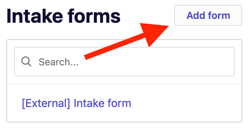
A new intake form page will be created automatically on your website. You can share this link directly with clients instead of sending PDFs or text documents back and forth.
3\. Enter a **Form title** and select a **Form type**.
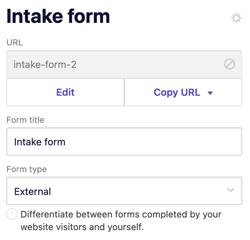
- - **External form** – for forms you send to prospects or clients.
- **Internal form** – for your own note-taking or internal use.
4\. Under URL, click `Edit`, then enter a clear and memorable URL for your form (e.g., *client-intake*, *service-intake*, or *intake-notes*).
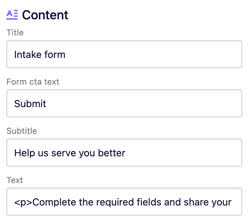
5\. Under **Content**, customize the text for your form, including:
- - Title
- Call-to-action (CTA) text
- Subtitle
- Text
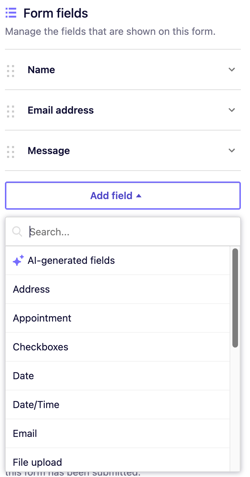
6. To add or edit form questions, go to the **Form fields** section. Click `Add field` and choose from the available options.
**Tip:** To learn more about customizing forms, check [this article](https://support.b12.io/en/articles/3633654-customize-a-contact-form?hsLang=en).
7\. Customize the automated email responses sent to you and your clients. You can edit the **From**, **Template**, **Cc**, and **Bcc** fields as needed.
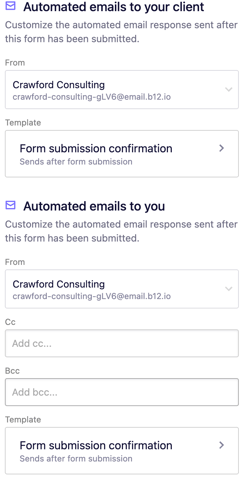
8\. Click `Preview` in the top-right corner of the editor to view your form. When you’re ready for it to go live, click `Publish`.
All submitted client intake and note-taking forms are automatically stored in your contact manager. This allows you to view and manage all client data easily in one place.
Open contact manager to see a list of all contacts who have submitted forms through your website.
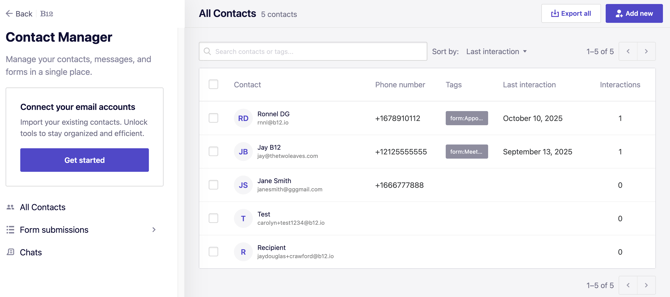
- Click any contact’s row to view more details, including form submissions and any intake notes you’ve added.
- Click `Form submissions` to view all responses for a specific form.
- [Getting started](https://support.b12.io/en/getting-started?hsLang=en#main-content)
- [Introduction](https://support.b12.io/en/getting-started?hsLang=en#introduction)
- [Detailed guides](https://support.b12.io/en/getting-started?hsLang=en#detailed-guides)
- [Working with B12's AI Agent](https://support.b12.io/en/working-with-b12s-ai-agent?hsLang=en#main-content)
- [Agent Skills](https://support.b12.io/en/working-with-b12s-ai-agent?hsLang=en#agent-skills)
- [Built-in features](https://support.b12.io/en/built-in-features?hsLang=en#main-content)
- [Visual edit](https://support.b12.io/en/built-in-features?hsLang=en#visual-edit)
- [Code editor](https://support.b12.io/en/built-in-features?hsLang=en#code-editor)
- [Data & users (Backends)](https://support.b12.io/en/built-in-features?hsLang=en#data-users-backends)
- [Forms & submissions](https://support.b12.io/en/built-in-features?hsLang=en#forms-submissions)
- [Commerce](https://support.b12.io/en/built-in-features?hsLang=en#commerce)
- [Contact manager](https://support.b12.io/en/built-in-features?hsLang=en#contact-manager)
- [eSignatures](https://support.b12.io/en/built-in-features?hsLang=en#esignatures)
- [Email Marketing](https://support.b12.io/en/built-in-features?hsLang=en#email-marketing)
- [Team](https://support.b12.io/en/built-in-features?hsLang=en#team)
- [Analytics](https://support.b12.io/en/built-in-features?hsLang=en#analytics)
- [Website settings](https://support.b12.io/en/built-in-features?hsLang=en#website-settings)
- [Adding functionality](https://support.b12.io/en/adding-functionality?hsLang=en#main-content)
- [Third-party integrations](https://support.b12.io/en/adding-functionality?hsLang=en#third-party-integrations)
- [Multimedia Integrations](https://support.b12.io/en/adding-functionality?hsLang=en#multimedia-integrations)
- [Publishing & growing](https://support.b12.io/en/publishing-growing?hsLang=en#main-content)
- [Domains](https://support.b12.io/en/publishing-growing?hsLang=en#domains)
- [Connecting your Domain](https://support.b12.io/en/publishing-growing?hsLang=en#connecting-your-domain)
- [Managing Your Domain](https://support.b12.io/en/publishing-growing?hsLang=en#managing-your-domain)
- [Email Forwarding & Sending](https://support.b12.io/en/publishing-growing?hsLang=en#email-forwarding-sending)
- [Growth & Marketing](https://support.b12.io/en/publishing-growing?hsLang=en#growth-marketing)
- [Troubleshooting](https://support.b12.io/en/troubleshooting?hsLang=en#main-content)
- [FAQs](https://support.b12.io/en/troubleshooting?hsLang=en#faqs)
- [Account & billing](https://support.b12.io/en/account-billing?hsLang=en#main-content)
- [Account Login & Password](https://support.b12.io/en/account-billing?hsLang=en#account-login-password)
- [Subscription & Payment Information](https://support.b12.io/en/account-billing?hsLang=en#subscription-payment-information)
- [Your Account](https://support.b12.io/en/account-billing?hsLang=en#your-account)
- [Managing Multiple Websites](https://support.b12.io/en/account-billing?hsLang=en#managing-multiple-websites)
- [Multi-user](https://support.b12.io/en/account-billing?hsLang=en#multi-user)
- [Getting support](https://support.b12.io/en/getting-support?hsLang=en#main-content)
- [Professional & Advanced Plan Support (B12 2.0)](https://support.b12.io/en/getting-support?hsLang=en#professional-advanced-plan-support-b12-2-0)
- [B12 2.0](https://support.b12.io/en/b12-2-0?hsLang=en#main-content)
- [Website Structure and Content](https://support.b12.io/en/b12-2-0?hsLang=en#website-structure-and-content)
- [Website Style & Design](https://support.b12.io/en/b12-2-0?hsLang=en#website-style-design)
- [Sitewide Settings](https://support.b12.io/en/b12-2-0?hsLang=en#sitewide-settings)
- [Using the B12 Editor](https://support.b12.io/en/b12-2-0?hsLang=en#using-the-b12-editor)
- [Analytics & SEO](https://support.b12.io/en/b12-2-0?hsLang=en#analytics-seo)
- [Integrations - General](https://support.b12.io/en/b12-2-0?hsLang=en#integrations-general)
- [Integrations - Communication](https://support.b12.io/en/b12-2-0?hsLang=en#integrations-communication)
- [Integrations - Language](https://support.b12.io/en/b12-2-0?hsLang=en#integrations-language)
- [Integrations - Ecommerce](https://support.b12.io/en/b12-2-0?hsLang=en#integrations-ecommerce)
- [Professional & Advanced Plan Features](https://support.b12.io/en/b12-2-0?hsLang=en#professional-advanced-plan-features)
- [Troubleshooting & Resources](https://support.b12.io/en/b12-2-0?hsLang=en#troubleshooting-resources)
- [Contact Forms](https://support.b12.io/en/b12-2-0?hsLang=en#contact-forms)
- [Online Scheduling](https://support.b12.io/en/b12-2-0?hsLang=en#online-scheduling)
- [Advanced Editing (Experts Only)](https://support.b12.io/en/b12-2-0?hsLang=en#advanced-editing-experts-only)
[](https://www.b12.io)
© 2025 B12. All rights reserved.
×