---
title: Manually overriding your website's colors [B12 2.0]
description: Learn how to manually override your B12 website’s colors sitewide, customize light, dark, and accent settings, and restore previous versions if needed.
---
[Skip to content](https://support.b12.io/en/v2/manually-overriding-your-websites-colors#main-content)
[](https://support.b12.io/en?hsLang=en)
- [B12 Website](https://www.b12.io/)
- Products
Show submenu for Products
- [AI Builder](https://www.b12.io/ai-website-builder)
- [Templates](https://www.b12.io/ai-website-prompt-gallery)
- [Resources](https://www.b12.io/resource-center)
- [Pricing](https://www.b12.io/pricing)
- [Log in](https://b12.io/dashboard/)
Open main navigation
Close main navigation
- [B12 Website](https://www.b12.io/)
- Products
Show submenu for Products
- [AI Builder](https://www.b12.io/ai-website-builder)
- [Templates](https://www.b12.io/ai-website-prompt-gallery)
- [Resources](https://www.b12.io/resource-center)
- [Pricing](https://www.b12.io/pricing)
- [Log in](https://b12.io/dashboard/)
- [Start for free](https://b12.io/signup/)
[Start for free](https://b12.io/signup/)
How can we help?
- There are no suggestions because the search field is empty.
1. [B12 Help Center](https://support.b12.io/en?hsLang=en)
2. [B12 2.0](https://support.b12.io/en/b12-2-0?hsLang=en)
3. [Website Style & Design](https://support.b12.io/en/b12-2-0?hsLang=en#website-style-design)
# Manually overriding your website's colors \[B12 2.0\]
## Learn how to manually override your website's colors.
|  Written by: Madeline B. Last updated: 29 Sep., 2025 |
| --- |
If you have a specific color palette in mind, you can apply it to your website by following these steps:
**Note:** This article covers steps to manually override your website's light, dark, and accent colors sitewide. If you would like to update your website's colors, font, or theme without customization, refer to [this article](https://support.b12.io/en/articles/1516955-changing-website-theme-colors-and-fonts?hsLang=en).
### Customizing your website's color palette
1\. In the left sidebar, click `Website` **\>** `Style` **\>** `Colors`.
2\. Click `Override colors`.
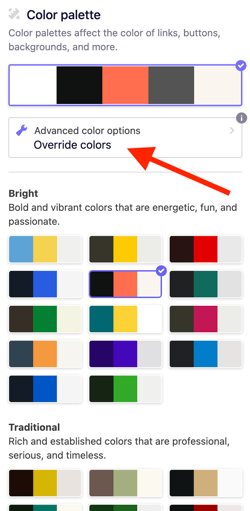
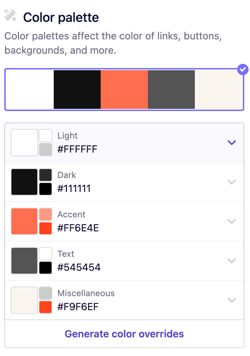
3\. Under the **Color palette** section, adjust settings for Light, Dark, Accent, Text, and Miscellaneous.
Click on the color you want to edit, then use the color picker, hex code, or RGB values to match your exact brand colors.
You can select a color using the gradient tool provided or by copying and pasting the hex code of the exact color you'd like to utilize
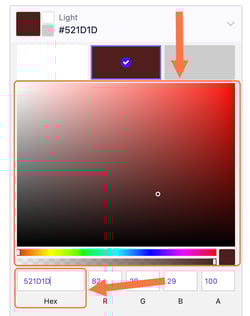
**Tip:** Before changing your palette, note your current color values so you can revert if needed.
4\. When finished, click `Generate color overrides`.
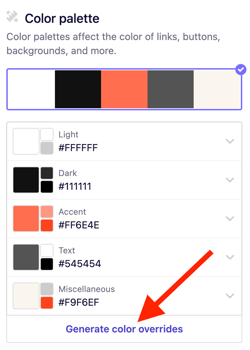
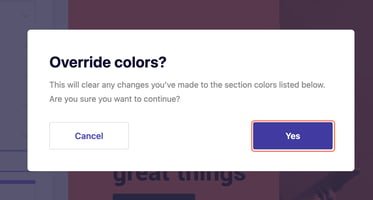
5\. Click **Yes**. Your site preview in the right-hand editor will update automatically. Continue refining until the colors align with your brand.
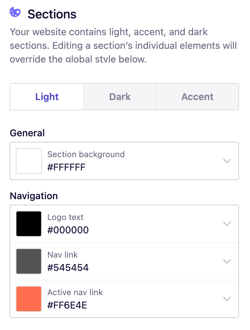
5\. For even more customization, you can adjust color settings for individual sections of your site. Under **Sections**, you’ll see Light, Dark, and Accent options for the following areas:
- **General** – Section background
- **Navigation** – Logo text, navigation links, active navigation link
- **Hero** – Title, subtitle, content box background
- **Content** – Section title, section subtitle, text, secondary text, links (and hover states), social links (and hover states)
- **Collection items** – Title, subtitle, note, date, description, summary
- **Forms** – Labels, field background, borders, placeholders, text
- **Scheduling form** – Title, title background, current date, weekdays, day buttons, daytime labels, empty day message, timezone dropdown
- **Contact details** – Title, links (and hover states)
- **Sliders** – Arrows, arrow backgrounds, dots, testimonial quotes, names, positions
- **Footer** – Group/column titles, links (and hover states)
- **Miscellaneous** – Borders, decorative elements, alternating backgrounds, danger color
6\. To make your changes live, click `Publish` in the top-right corner.
**Note:** Overriding colors changes them **sitewide**. If you want to revert later, you can either:
- Manually reapply your original colors using this same process.
- [Restore a previous version](https://support.b12.io/en/articles/1506628-restoring-your-website-to-undo-changes?hsLang=en)of your site from **Website \> History**.
- [Getting started](https://support.b12.io/en/getting-started?hsLang=en#main-content)
- [Introduction](https://support.b12.io/en/getting-started?hsLang=en#introduction)
- [Detailed guides](https://support.b12.io/en/getting-started?hsLang=en#detailed-guides)
- [Working with B12's AI Agent](https://support.b12.io/en/working-with-b12s-ai-agent?hsLang=en#main-content)
- [Agent Skills](https://support.b12.io/en/working-with-b12s-ai-agent?hsLang=en#agent-skills)
- [Built-in features](https://support.b12.io/en/built-in-features?hsLang=en#main-content)
- [Visual edit](https://support.b12.io/en/built-in-features?hsLang=en#visual-edit)
- [Code editor](https://support.b12.io/en/built-in-features?hsLang=en#code-editor)
- [Data & users (Backends)](https://support.b12.io/en/built-in-features?hsLang=en#data-users-backends)
- [Forms & submissions](https://support.b12.io/en/built-in-features?hsLang=en#forms-submissions)
- [Commerce](https://support.b12.io/en/built-in-features?hsLang=en#commerce)
- [Contact manager](https://support.b12.io/en/built-in-features?hsLang=en#contact-manager)
- [eSignatures](https://support.b12.io/en/built-in-features?hsLang=en#esignatures)
- [Email Marketing](https://support.b12.io/en/built-in-features?hsLang=en#email-marketing)
- [Team](https://support.b12.io/en/built-in-features?hsLang=en#team)
- [Analytics](https://support.b12.io/en/built-in-features?hsLang=en#analytics)
- [Website settings](https://support.b12.io/en/built-in-features?hsLang=en#website-settings)
- [Adding functionality](https://support.b12.io/en/adding-functionality?hsLang=en#main-content)
- [Third-party integrations](https://support.b12.io/en/adding-functionality?hsLang=en#third-party-integrations)
- [Multimedia Integrations](https://support.b12.io/en/adding-functionality?hsLang=en#multimedia-integrations)
- [Publishing & growing](https://support.b12.io/en/publishing-growing?hsLang=en#main-content)
- [Domains](https://support.b12.io/en/publishing-growing?hsLang=en#domains)
- [Connecting your Domain](https://support.b12.io/en/publishing-growing?hsLang=en#connecting-your-domain)
- [Managing Your Domain](https://support.b12.io/en/publishing-growing?hsLang=en#managing-your-domain)
- [Email Forwarding & Sending](https://support.b12.io/en/publishing-growing?hsLang=en#email-forwarding-sending)
- [Growth & Marketing](https://support.b12.io/en/publishing-growing?hsLang=en#growth-marketing)
- [Troubleshooting](https://support.b12.io/en/troubleshooting?hsLang=en#main-content)
- [FAQs](https://support.b12.io/en/troubleshooting?hsLang=en#faqs)
- [Account & billing](https://support.b12.io/en/account-billing?hsLang=en#main-content)
- [Account Login & Password](https://support.b12.io/en/account-billing?hsLang=en#account-login-password)
- [Subscription & Payment Information](https://support.b12.io/en/account-billing?hsLang=en#subscription-payment-information)
- [Your Account](https://support.b12.io/en/account-billing?hsLang=en#your-account)
- [Managing Multiple Websites](https://support.b12.io/en/account-billing?hsLang=en#managing-multiple-websites)
- [Multi-user](https://support.b12.io/en/account-billing?hsLang=en#multi-user)
- [Getting support](https://support.b12.io/en/getting-support?hsLang=en#main-content)
- [Professional & Advanced Plan Support (B12 2.0)](https://support.b12.io/en/getting-support?hsLang=en#professional-advanced-plan-support-b12-2-0)
- [B12 2.0](https://support.b12.io/en/b12-2-0?hsLang=en#main-content)
- [Website Structure and Content](https://support.b12.io/en/b12-2-0?hsLang=en#website-structure-and-content)
- [Website Style & Design](https://support.b12.io/en/b12-2-0?hsLang=en#website-style-design)
- [Sitewide Settings](https://support.b12.io/en/b12-2-0?hsLang=en#sitewide-settings)
- [Using the B12 Editor](https://support.b12.io/en/b12-2-0?hsLang=en#using-the-b12-editor)
- [Analytics & SEO](https://support.b12.io/en/b12-2-0?hsLang=en#analytics-seo)
- [Integrations - General](https://support.b12.io/en/b12-2-0?hsLang=en#integrations-general)
- [Integrations - Communication](https://support.b12.io/en/b12-2-0?hsLang=en#integrations-communication)
- [Integrations - Language](https://support.b12.io/en/b12-2-0?hsLang=en#integrations-language)
- [Integrations - Ecommerce](https://support.b12.io/en/b12-2-0?hsLang=en#integrations-ecommerce)
- [Professional & Advanced Plan Features](https://support.b12.io/en/b12-2-0?hsLang=en#professional-advanced-plan-features)
- [Troubleshooting & Resources](https://support.b12.io/en/b12-2-0?hsLang=en#troubleshooting-resources)
- [Contact Forms](https://support.b12.io/en/b12-2-0?hsLang=en#contact-forms)
- [Online Scheduling](https://support.b12.io/en/b12-2-0?hsLang=en#online-scheduling)
- [Advanced Editing (Experts Only)](https://support.b12.io/en/b12-2-0?hsLang=en#advanced-editing-experts-only)
[](https://www.b12.io)
© 2025 B12. All rights reserved.
×