---
title: Mapping and unmapping content on product and service pages [B12 2.0]
description: Learn more about how to map and unmap content on service and product pages
---
[Skip to content](https://support.b12.io/en/v2/mapping-and-unmapping-content-on-team-member-pages#main-content)
[](https://support.b12.io/en?hsLang=en)
- [B12 Website](https://www.b12.io/)
- Products
Show submenu for Products
- Sites
Show submenu for Sites
- [AI builder](https://www.b12.io/ai-website-builder)
- [Backends](https://www.b12.io/backends)
- Client engagement
Show submenu for Client engagement
- [Client intake forms](https://www.b12.io/client-intake-forms)
- [Contact manager](https://www.b12.io/contact-manager)
- [Templates](https://www.b12.io/ai-website-prompt-gallery)
- Resources
Show submenu for Resources
- [Resource center](https://www.b12.io/resource-center)
- [Case studies](https://www.b12.io/case-studies)
- [Pricing](https://www.b12.io/pricing)
- [Log in](https://b12.io/dashboard/)
Open main navigation
Close main navigation
- [B12 Website](https://www.b12.io/)
- Products
Show submenu for Products
- Sites
Show submenu for Sites
- [AI builder](https://www.b12.io/ai-website-builder)
- [Backends](https://www.b12.io/backends)
- Client engagement
Show submenu for Client engagement
- [Client intake forms](https://www.b12.io/client-intake-forms)
- [Contact manager](https://www.b12.io/contact-manager)
- [Templates](https://www.b12.io/ai-website-prompt-gallery)
- Resources
Show submenu for Resources
- [Resource center](https://www.b12.io/resource-center)
- [Case studies](https://www.b12.io/case-studies)
- [Pricing](https://www.b12.io/pricing)
- [Log in](https://b12.io/dashboard/)
- [Start for free](https://b12.io/signup/)
[Start for free](https://b12.io/signup/)
How can we help?
- There are no suggestions because the search field is empty.
1. [B12 Help Center](https://support.b12.io/en?hsLang=en)
2. [B12 2.0](https://support.b12.io/en/b12-2-0?hsLang=en)
3. [Advanced Editing (Experts Only)](https://support.b12.io/en/b12-2-0?hsLang=en#advanced-editing-experts-only)
# Mapping and unmapping content on product and service pages \[B12 2.0\]
## Learn more about how to map and unmap content on service and product pages
|  Written by: Madeline B. Last updated: 26 Dec., 2025 |
| --- |
B12 uses templates for product and service pages to keep layouts consistent across your site. While templates define the structure of the page, you can control what content appears in each field.
Mapping content lets a field automatically display product- or service-specific information, such as the name or price.
Unmapping content lets you show the same static text or images on every page that uses the template.
### Mapping content
You also have the option to decide what text or photos accompany the template. We call this mapping. When you map a field of the website editor, you’re telling it what content to display on the page.
For example, you can **map** the Title to show the product or service's name, or you can **set** the Title to always display the same text, no matter the product or service.
1\. In the left sidebar menu, go to **` Website` \>** ` Pages`.
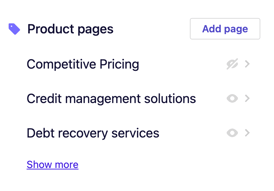
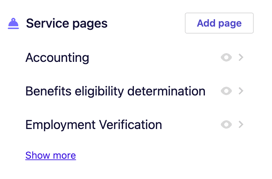
2\. Scroll down to the section labeled **Product** **pages** or **Service** **pages**. Select any product or service from the list.
#### 
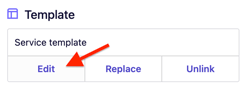
3\. Scroll to **Template**, then click `Edit`.
### 
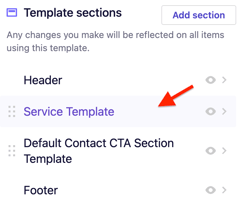
4\. Click **`Product Template`** or**`Service Template`** from your list of sections.
### 
You will then see a section labeled **Content**; this is where you will do the mapping.
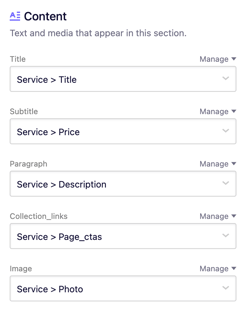
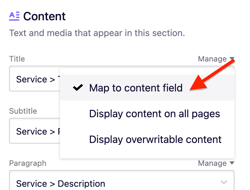
5\. Click `Manage` beside the field you want to map, then select `Map content to field`.
#### 
6\. You can then select which field you want this area to display automatically, such as *Title* or *Price.*
*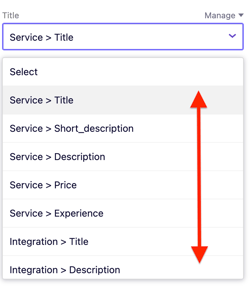*
**Note:** Mapped content will display different content on each page relating to the specific product or service.
7\. Click `Publish` to make your changes live.
### Unmapping content
1\. In the left sidebar menu, go to **` Website` \>** ` Pages`.
2\. Scroll down to the section labeled **Product** **pages** or **Service** **pages**. Select any product or service from the list.
#### 
3\. Scroll to **Template**, then click `Edit`.
### 
4\. Click **`Product Template`** or**`Service Template`** from your list of sections.
### 
You will then see a section labeled **Content**; this is where you will do the unmapping.

5\. Click `Manage` beside the field you want to map, then select `Display content on all pages`.
#### 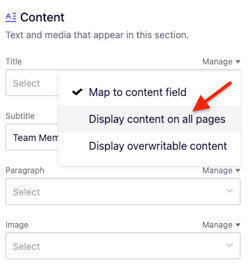
6\. You will then be able to draft content in that field. Unmapped content will display the same static content on all pages using your template regardless of the product or service.
7\. Click `Publish` to make your changes live.
- [Getting started](https://support.b12.io/en/getting-started?hsLang=en#main-content)
- [Introduction](https://support.b12.io/en/getting-started?hsLang=en#introduction)
- [Detailed guides](https://support.b12.io/en/getting-started?hsLang=en#detailed-guides)
- [Working with B12's AI Agent](https://support.b12.io/en/working-with-b12s-ai-agent?hsLang=en#main-content)
- [Agent Skills](https://support.b12.io/en/working-with-b12s-ai-agent?hsLang=en#agent-skills)
- [Built-in features](https://support.b12.io/en/built-in-features?hsLang=en#main-content)
- [Visual edit](https://support.b12.io/en/built-in-features?hsLang=en#visual-edit)
- [Code editor](https://support.b12.io/en/built-in-features?hsLang=en#code-editor)
- [Data & users (Backends)](https://support.b12.io/en/built-in-features?hsLang=en#data-users-backends)
- [Forms & submissions](https://support.b12.io/en/built-in-features?hsLang=en#forms-submissions)
- [Commerce](https://support.b12.io/en/built-in-features?hsLang=en#commerce)
- [Contact manager](https://support.b12.io/en/built-in-features?hsLang=en#contact-manager)
- [eSignatures](https://support.b12.io/en/built-in-features?hsLang=en#esignatures)
- [Email Marketing](https://support.b12.io/en/built-in-features?hsLang=en#email-marketing)
- [Team](https://support.b12.io/en/built-in-features?hsLang=en#team)
- [Analytics](https://support.b12.io/en/built-in-features?hsLang=en#analytics)
- [Website settings](https://support.b12.io/en/built-in-features?hsLang=en#website-settings)
- [Adding functionality](https://support.b12.io/en/adding-functionality?hsLang=en#main-content)
- [Third-party integrations](https://support.b12.io/en/adding-functionality?hsLang=en#third-party-integrations)
- [Multimedia Integrations](https://support.b12.io/en/adding-functionality?hsLang=en#multimedia-integrations)
- [Publishing & growing](https://support.b12.io/en/publishing-growing?hsLang=en#main-content)
- [Domains](https://support.b12.io/en/publishing-growing?hsLang=en#domains)
- [Connecting your Domain](https://support.b12.io/en/publishing-growing?hsLang=en#connecting-your-domain)
- [Managing Your Domain](https://support.b12.io/en/publishing-growing?hsLang=en#managing-your-domain)
- [Email Forwarding & Sending](https://support.b12.io/en/publishing-growing?hsLang=en#email-forwarding-sending)
- [Growth & Marketing](https://support.b12.io/en/publishing-growing?hsLang=en#growth-marketing)
- [Troubleshooting](https://support.b12.io/en/troubleshooting?hsLang=en#main-content)
- [FAQs](https://support.b12.io/en/troubleshooting?hsLang=en#faqs)
- [Account & billing](https://support.b12.io/en/account-billing?hsLang=en#main-content)
- [Account Login & Password](https://support.b12.io/en/account-billing?hsLang=en#account-login-password)
- [Subscription & Payment Information](https://support.b12.io/en/account-billing?hsLang=en#subscription-payment-information)
- [Your Account](https://support.b12.io/en/account-billing?hsLang=en#your-account)
- [Managing Multiple Websites](https://support.b12.io/en/account-billing?hsLang=en#managing-multiple-websites)
- [Multi-user](https://support.b12.io/en/account-billing?hsLang=en#multi-user)
- [Getting support](https://support.b12.io/en/getting-support?hsLang=en#main-content)
- [Professional & Advanced Plan Support (B12 2.0)](https://support.b12.io/en/getting-support?hsLang=en#professional-advanced-plan-support-b12-2-0)
- [B12 2.0](https://support.b12.io/en/b12-2-0?hsLang=en#main-content)
- [Website Structure and Content](https://support.b12.io/en/b12-2-0?hsLang=en#website-structure-and-content)
- [Website Style & Design](https://support.b12.io/en/b12-2-0?hsLang=en#website-style-design)
- [Sitewide Settings](https://support.b12.io/en/b12-2-0?hsLang=en#sitewide-settings)
- [Using the B12 Editor](https://support.b12.io/en/b12-2-0?hsLang=en#using-the-b12-editor)
- [Analytics & SEO](https://support.b12.io/en/b12-2-0?hsLang=en#analytics-seo)
- [Integrations - General](https://support.b12.io/en/b12-2-0?hsLang=en#integrations-general)
- [Integrations - Communication](https://support.b12.io/en/b12-2-0?hsLang=en#integrations-communication)
- [Integrations - Language](https://support.b12.io/en/b12-2-0?hsLang=en#integrations-language)
- [Integrations - Ecommerce](https://support.b12.io/en/b12-2-0?hsLang=en#integrations-ecommerce)
- [Professional & Advanced Plan Features](https://support.b12.io/en/b12-2-0?hsLang=en#professional-advanced-plan-features)
- [Troubleshooting & Resources](https://support.b12.io/en/b12-2-0?hsLang=en#troubleshooting-resources)
- [Contact Forms](https://support.b12.io/en/b12-2-0?hsLang=en#contact-forms)
- [Online Scheduling](https://support.b12.io/en/b12-2-0?hsLang=en#online-scheduling)
- [Advanced Editing (Experts Only)](https://support.b12.io/en/b12-2-0?hsLang=en#advanced-editing-experts-only)
[](https://www.b12.io)
© 2025 B12. All rights reserved.
×