---
title: AI Agent [B12 2.0]
description: Learn how to use the B12 AI Agent to edit your website with simple prompts. See best practices, limitations, and tips for getting the best results.
---
[Skip to content](https://support.b12.io/en/v2/using-b12s-ai-agent#main-content)
[](https://support.b12.io/en?hsLang=en)
- [B12 Website](https://www.b12.io/)
- Products
Show submenu for Products
- [AI Builder](https://www.b12.io/ai-website-builder)
- [Templates](https://www.b12.io/ai-website-prompt-gallery)
- [Resources](https://www.b12.io/resource-center)
- [Pricing](https://www.b12.io/pricing)
- [Log in](https://b12.io/dashboard/)
Open main navigation
Close main navigation
- [B12 Website](https://www.b12.io/)
- Products
Show submenu for Products
- [AI Builder](https://www.b12.io/ai-website-builder)
- [Templates](https://www.b12.io/ai-website-prompt-gallery)
- [Resources](https://www.b12.io/resource-center)
- [Pricing](https://www.b12.io/pricing)
- [Log in](https://b12.io/dashboard/)
- [Start for free](https://b12.io/signup/)
[Start for free](https://b12.io/signup/)
How can we help?
- There are no suggestions because the search field is empty.
1. [B12 Help Center](https://support.b12.io/en?hsLang=en)
2. [B12 2.0](https://support.b12.io/en/b12-2-0?hsLang=en)
# AI Agent \[B12 2.0\]
## Learn how to use AI Agent in B12 2.0 to help you edit your website.
| .png?width=60&height=60&name=Untitled%20design%20(23).png) Written by: Ronnel DG Last updated: 12 Nov., 2025 |
| --- |
The AI Agent helps you manage your B12 website. Instead of digging through menus or manually making changes, you simply type what you want, and the AI Agent does it for you — usually in seconds.
### AI Agent
The AI Agent helps you manage and improve your website by:
- adding and editing pages and sections,
- replacing text and images,
- changing your site’s design (colors, layouts, etc.),
- publishing your site,
…and more.
Right now, the AI Agent handles more than 30 different types of actions: everything from adding pages and updating text to changing colors and publishing your site instantly.
**Note:** The AI Agent is still new. It may occasionally tell you that it completed a change when nothing appears. If that happens, you can always make the edit manually in the editor. [Chat with us](https://support.b12.io/en/chat-with-us?hsLang=en) if you need help making your changes.
### Accessing the AI Agent
When you open your website, you’ll see the left sidebar menu on the left-hand corner where you normally edit your site. To switch to the AI Agent, click the `AI Agent` tab next to the **Edit** tab.
-2.png?width=250&height=250&name=Untitled%20design%20(1)-2.png)
Clicking this tab opens a chat panel where you can type your requests directly to the AI Agent. From here, you can send prompts and let the AI Agent begin making updates to your website right away.
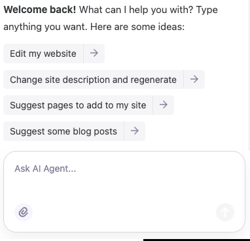
There are limits on how many AI messages you can send, depending on your plan:
- **Free:** Limited daily and monthly messages
- **Basic:** 100 messages/month
- **Professional & Advanced:** 300 messages/month
### Sample prompts
Here are some example prompts that you can try! Feel free to edit depending on what you need for your site.
**Pages and sections**
- *Add a Services page.*
- *Add a gallery section to my About page.*
- *Create a Testimonials section on the homepage.*
**Design and layout**
- *Switch to a green color palette.*
- *Change the layout of the Contact section.*
- *Update my theme with a more modern design.*
**Content and SEO**
- *Replace the About text with this new bio `[insert your new bio]`.*
- *Suggest new blog topics for my business.*
- *Provide SEO keywords for my business services.*
**Publishing and updates**
- *Tell me what’s missing before launch.*
- *Publish the site now.*
### Best practices for prompting
To get the best results:
- Keep your prompts short and clear — ideally **1–3 sentences**. Avoid pasting long documents or multi-page instructions.
- Be specific about what you want (“*Replace hero image with my uploaded logo*” instead of “*Make it better*”).
- If the Agent asks for clarification, choose the option that best matches your goal.
- Always review the changes to confirm they applied correctly.
- Select a specific section or element on your website before chatting with the AI Agent if you'd like it to change something specific.
The AI Agent is powerful, but it currently cannot:
- Generate images (though it can insert ones you upload).
- Add custom code or build entirely custom sections.
- Access Client Engagement tools (like sending email campaigns).
- Guarantee every request will succeed — sometimes it may say it completed a task when it hasn’t.
**Tip:** If something goes wrong, use **history snapshots** to [restore your site to a previous version](https://support.b12.io/en/articles/1506628-restoring-your-website-to-undo-changes?hsLang=en).
### FAQs
- **Can I upload an external document with instructions?**
- Not yet. Currently, the AI Agent only works with typed prompts.
- **Can it do everything?**
- No, but it already supports 30+ actions and continues to expand with new updates.
- **What should I do if it can’t handle my request?**
- The AI Agent may guide you to the right part of your account so you can finish the task manually. You can also browse our [Help Center](https://support.b12.io/en?hsLang=en)or use the **chat icon**  in the bottom-right corner.
- **What if the AI Agent makes a mistake?**
- Use [history snapshots](https://support.b12.io/en/articles/1506628-restoring-your-website-to-undo-changes?hsLang=en) to restore your site to a previous version.
- **How is AI Agent different from AI Assist?**
- **AI Agent** manages your whole site: structure, content, design, publishing, and more. It uses broader context and can take multiple types of instructions.
- **AI Assist** is focused on text and image generation within specific fields. Learn more about generating content with AI Assist [here](https://support.b12.io/en/articles/6992915-generating-text-with-help-from-ai-assist?hsLang=en).
- [Getting started](https://support.b12.io/en/getting-started?hsLang=en#main-content)
- [Introduction](https://support.b12.io/en/getting-started?hsLang=en#introduction)
- [Detailed guides](https://support.b12.io/en/getting-started?hsLang=en#detailed-guides)
- [Working with B12's AI Agent](https://support.b12.io/en/working-with-b12s-ai-agent?hsLang=en#main-content)
- [Agent Skills](https://support.b12.io/en/working-with-b12s-ai-agent?hsLang=en#agent-skills)
- [Built-in features](https://support.b12.io/en/built-in-features?hsLang=en#main-content)
- [Visual edit](https://support.b12.io/en/built-in-features?hsLang=en#visual-edit)
- [Code editor](https://support.b12.io/en/built-in-features?hsLang=en#code-editor)
- [Data & users (Backends)](https://support.b12.io/en/built-in-features?hsLang=en#data-users-backends)
- [Forms & submissions](https://support.b12.io/en/built-in-features?hsLang=en#forms-submissions)
- [Commerce](https://support.b12.io/en/built-in-features?hsLang=en#commerce)
- [Contact manager](https://support.b12.io/en/built-in-features?hsLang=en#contact-manager)
- [eSignatures](https://support.b12.io/en/built-in-features?hsLang=en#esignatures)
- [Email Marketing](https://support.b12.io/en/built-in-features?hsLang=en#email-marketing)
- [Team](https://support.b12.io/en/built-in-features?hsLang=en#team)
- [Analytics](https://support.b12.io/en/built-in-features?hsLang=en#analytics)
- [Website settings](https://support.b12.io/en/built-in-features?hsLang=en#website-settings)
- [Adding functionality](https://support.b12.io/en/adding-functionality?hsLang=en#main-content)
- [Third-party integrations](https://support.b12.io/en/adding-functionality?hsLang=en#third-party-integrations)
- [Multimedia Integrations](https://support.b12.io/en/adding-functionality?hsLang=en#multimedia-integrations)
- [Publishing & growing](https://support.b12.io/en/publishing-growing?hsLang=en#main-content)
- [Domains](https://support.b12.io/en/publishing-growing?hsLang=en#domains)
- [Connecting your Domain](https://support.b12.io/en/publishing-growing?hsLang=en#connecting-your-domain)
- [Managing Your Domain](https://support.b12.io/en/publishing-growing?hsLang=en#managing-your-domain)
- [Email Forwarding & Sending](https://support.b12.io/en/publishing-growing?hsLang=en#email-forwarding-sending)
- [Growth & Marketing](https://support.b12.io/en/publishing-growing?hsLang=en#growth-marketing)
- [Troubleshooting](https://support.b12.io/en/troubleshooting?hsLang=en#main-content)
- [FAQs](https://support.b12.io/en/troubleshooting?hsLang=en#faqs)
- [Account & billing](https://support.b12.io/en/account-billing?hsLang=en#main-content)
- [Account Login & Password](https://support.b12.io/en/account-billing?hsLang=en#account-login-password)
- [Subscription & Payment Information](https://support.b12.io/en/account-billing?hsLang=en#subscription-payment-information)
- [Your Account](https://support.b12.io/en/account-billing?hsLang=en#your-account)
- [Managing Multiple Websites](https://support.b12.io/en/account-billing?hsLang=en#managing-multiple-websites)
- [Multi-user](https://support.b12.io/en/account-billing?hsLang=en#multi-user)
- [Getting support](https://support.b12.io/en/getting-support?hsLang=en#main-content)
- [Professional & Advanced Plan Support (B12 2.0)](https://support.b12.io/en/getting-support?hsLang=en#professional-advanced-plan-support-b12-2-0)
- [B12 2.0](https://support.b12.io/en/b12-2-0?hsLang=en#main-content)
- [Website Structure and Content](https://support.b12.io/en/b12-2-0?hsLang=en#website-structure-and-content)
- [Website Style & Design](https://support.b12.io/en/b12-2-0?hsLang=en#website-style-design)
- [Sitewide Settings](https://support.b12.io/en/b12-2-0?hsLang=en#sitewide-settings)
- [Using the B12 Editor](https://support.b12.io/en/b12-2-0?hsLang=en#using-the-b12-editor)
- [Analytics & SEO](https://support.b12.io/en/b12-2-0?hsLang=en#analytics-seo)
- [Integrations - General](https://support.b12.io/en/b12-2-0?hsLang=en#integrations-general)
- [Integrations - Communication](https://support.b12.io/en/b12-2-0?hsLang=en#integrations-communication)
- [Integrations - Language](https://support.b12.io/en/b12-2-0?hsLang=en#integrations-language)
- [Integrations - Ecommerce](https://support.b12.io/en/b12-2-0?hsLang=en#integrations-ecommerce)
- [Professional & Advanced Plan Features](https://support.b12.io/en/b12-2-0?hsLang=en#professional-advanced-plan-features)
- [Troubleshooting & Resources](https://support.b12.io/en/b12-2-0?hsLang=en#troubleshooting-resources)
- [Contact Forms](https://support.b12.io/en/b12-2-0?hsLang=en#contact-forms)
- [Online Scheduling](https://support.b12.io/en/b12-2-0?hsLang=en#online-scheduling)
- [Advanced Editing (Experts Only)](https://support.b12.io/en/b12-2-0?hsLang=en#advanced-editing-experts-only)
[](https://www.b12.io)
© 2025 B12. All rights reserved.
×