
 Written by: Ronnel DG
Last updated: 08 Jan., 2026
|
This feature requires at least one Client Engagement seat. View plans and pricing here. |
B12 Email Marketing includes a library of pre-written emails for common use cases like welcome messages, event announcements, and survey requests. You can also start from scratch with a blank email and fully customize the content to match your needs.
Creating a new email
1. In the left sidebar menu, go to  Email marketing
2. All your drafted, sent, and automated emails can be managed here. Click Start a new email.
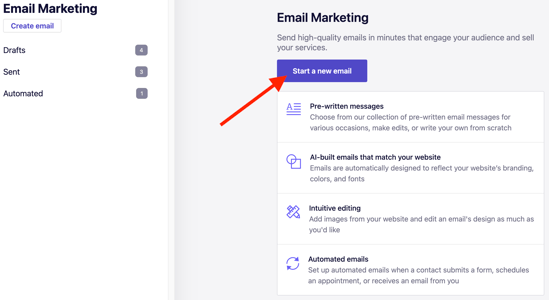
3. Choose a template.
B12 offers pre-written templates for various purposes, including welcome messages, event announcements, and survey requests.
To start from scratch, select Blank email.
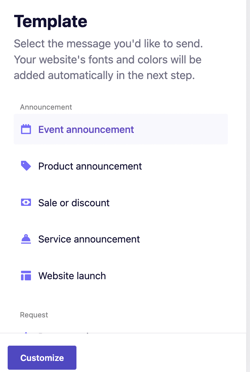
4. After selecting a template, click Customize to personalize your email’s text, images, and layout.