
|
Written by: Meredith Last updated: 13 Oct., 2026 |
|
This feature is currently available only to users located in the United States. |

When a client pays an invoice online, the payment is first processed and then held in your B12 Commerce balance. Once the funds clear, you can create a payout to move that money into your connected bank account.
This keeps your client payments organized and makes it easier to track what has been paid out versus what is still pending.
Creating a payout
1. In the left sidebar menu, click  Commerce
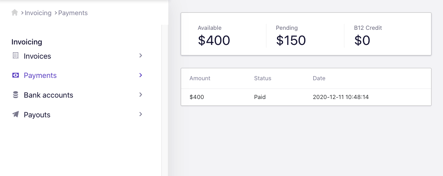
2. Click Payments.
Funds under Available are ready to be transferred to a bank account.
Funds under Pending will become available 2-5 business days after you received the payment confirmation email. After you create a payout, it usually reaches your bank in about 1 business day; some banks take 2-3 more days. Your first payout, or one after you change bank details, may be reviewed for up to 10 business days.
3. Click Payouts and click Create payout to transfer the funds.
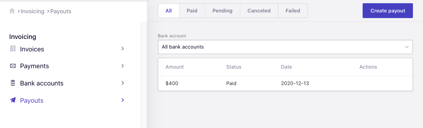
If you need to change the bank account that is receiving the payment, you can do so under Bank accounts.
Learn more about B12 Commerce here.