
|
Written by: Jay Douglas |
|
This feature is currently available only to users located in the United States. |

If you sent a client an invoice from your B12 account but they paid you with an external method (e.g., cash, check), you'll want to mark their invoice as paid to keep your books in order and to prevent them from receiving payment reminder emails.
Marking an invoice as paid
1. Go to  Commerce
2. Search for the client's name or invoice number.
3. Next to the client's name, click ⋯ under the Action column.
4. Click Mark as paid.
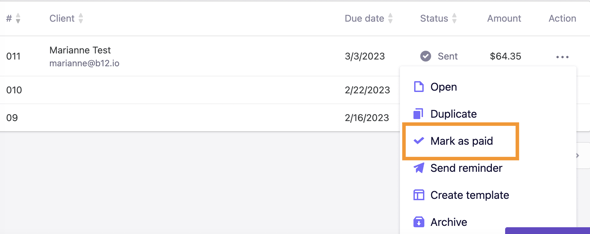
The invoice status will then change to Paid.