
|
Written by: Ronnel DG |
|
This feature is currently available only to users located in the United States. |

If you see the message “Strip verification required,” it means your Stripe account has not been fully set up yet. Your B12 Payments and Invoicing features cannot work until Stripe verifies your business information.
Follow the steps below to finish setting up your Stripe account.
Fixing the Stripe verification error
1. In the left sidebar menu, click  Commerce
2. Look for a yellow notification bar at the top of the page and click Continue.

3. A panel will open on the left side of your screen. Click Continue to Stripe to start the verification process.
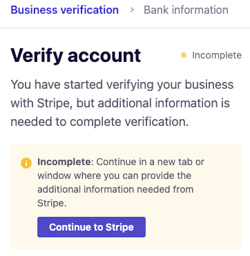
4. Complete the required business information in Stripe.
5. Submit your details. Your Stripe account will finish verification, and your B12 payment settings will update automatically once your account is reviewed.