
|
Written by: Jay Douglas Last updated: 02 Dec., 2025 |

Adding Shopify as an integration gives your customers a smooth shopping experience by letting them browse and purchase products directly on your website. Keeping visitors on your site increases the chances they will complete a purchase.
You will need a Shopify account before beginning. By the end of this article, you will have the embed code for a Shopify collection that you can add to your B12 website.
Adding Shopify
1. Make sure you have your embed code from your Shopify dashboard. For help finding it, refer to Shopify's documentation.
2. In the left sidebar menu, go to  Website
 Pages
Pages
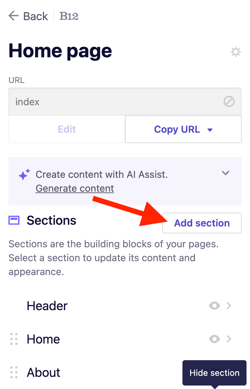
3. Select the page where you want to add your embedded content. Click Add section.
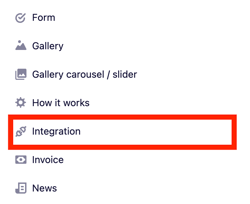
4. From the list of section types, click Integration.
5. Select Shopify.
6. Paste your embed code into the code box.
7. Click Add integration.
8. Click Publish to update your live website.