
 Written by: Jay Douglas Last Updated: 6 Mar., 2025 |
Adding Google Calendar as an integration can be quick and easy, and something worth considering to allow your customers to see what activities your business is up to. When you integrate a calendar directly into your website, you keep customers on your website and increase the likelihood they will make an appointment with you.
Adding Google Calendar
-
Open Google Calendar on your computer.
-
Click
Settings.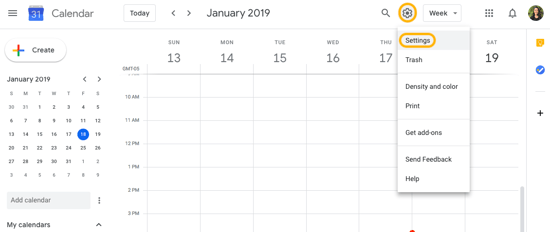
-
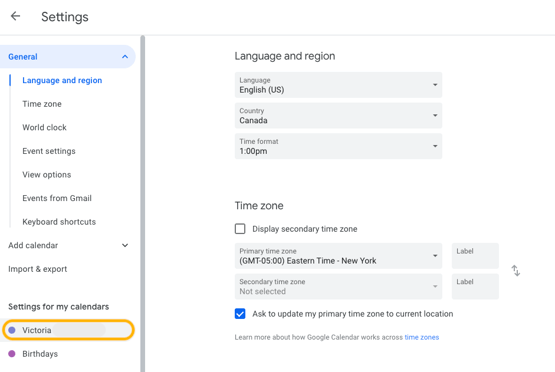
Click the calendar you want to embed.
-
Click
Integrate calendar.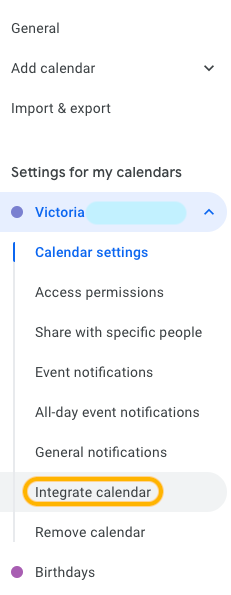
-
Copy the code in the Embed code section.
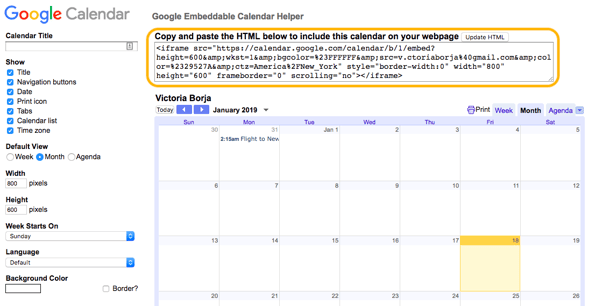
- If you click
Customize, you can preview the calendar and toggle display options. If you choose any new options for the calendar, ensure you clickUpdate HTMLand copy the new code. - Follow these instructions to add the integration.
Note: You can only get the embed code from a computer (not available in the app).