
|
Written by: Ronnel DG Last updated: 28 Aug., 2026 |

You can build more than one website from a single B12 account, whether that's a second business, a side project, or a site you look after for someone else. This article covers adding a new website, moving between the sites on your account, and deciding when a site is better off with its own login.
Note: Each website has its own subscription. Adding a website doesn't change the plan on the site you already have, and upgrading one site doesn't upgrade the others. See B12 website subscription plans and pricing.
Choosing between one login and separate logins
Most people keep every site under one login. You sign in once, move between your websites from the same menu, and manage them all with a single email address and password.
A separate B12 account, with its own email address, is the better choice when a website needs an owner of its own. That's usually the case for a site you're building for a client who will take it over, or one that a business partner needs to access without seeing your other sites.
Caution: Once websites are created under the same login, they can't be separated later. If a site will eventually need its own owner, set it up under a separate account from the start. See Creating a new B12 account and login.
Adding a new website
You add websites from the account menu in the B12 Editor, the same place you switch between the sites you already have.
- Click the
 B12 logo in the upper-left corner of the B12 Editor.
 - Under WEBSITES, click
 Create new website
 - Enter your business name and a description of the business. The more you describe, the closer the first draft will be to what you want.
Optional: clickEnhance Promptto have B12 expand and refine your description first. You'll see the expanded version before anything is built. - Click the
 up arrow to start. Your new website is usually generated in 3–5 minutes, depending on the complexity of your site.
Switching between your websites
Each website has its own content, settings, domain, and subscription, so you work on one at a time. Moving between them takes two clicks.
- Click the B12 logo in the upper-left corner of the B12 Editor.
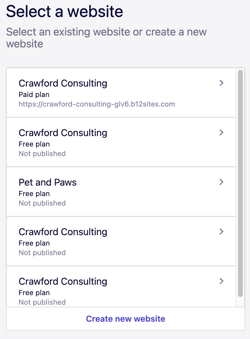
- Click
Switchnext to your website's name. - Select the website you want from the list. The editor loads that site, and everything you do from that point applies to it.
Frequently asked questions
→Can I move a website to a different account later?
⇒No. Websites created under the same login can't be separated afterwards. If a site will need its own owner, create it under a separate account with its own email address from the start.
→Do I need a separate subscription for each website?
⇒Yes, if you want to upgrade it. Each website is billed on its own subscription, so upgrading one site leaves the others on the plan they're already on.
→Will a new website change the site I already have?
⇒No. Your sites are independent, so edits, publishing, and domain changes on one don't affect the other.