
|
Written by: Katelyn Gray Last updated: 13 Oct., 2026 |
|
This feature requires at least one Client Engagement seat. View available plans and pricing here. |

Before you send an email campaign, it’s important to review and update your email details. In B12 Email Marketing, you can control exactly how your message appears to recipients — including the sender name, subject line, and preview text.
Editing your email details
1. After you’ve created and customized your email template, you can edit its basic details and settings before sending it to your contacts. Click Continue.
2. Under Email title, edit the text. This title doesn’t appear in the email itself, but it helps you stay organized and track your sent emails.
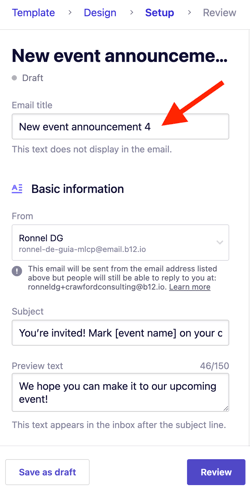
3. Under Basic information, update your sending details and content preview:

-
From: This is the email address your recipients will see in the From field. By default, B12 assigns an address ending with @email.b12.io.
- To use your own domain (for example, hello@yourbusiness.com), first set up email sending for your domain, then add your custom address as a Team member.
-
Subject: Write a clear, engaging subject line that motivates recipients to open your email. Keep subject lines under 50 characters for the best results.
-
Preview text: This short text appears in inbox previews after the subject line. Use it to add context or encourage readers to open your email.
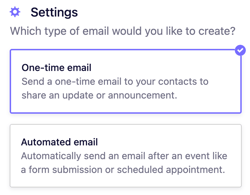
4. Under Settings, choose the type of email you want to create:
-
One-time email: Send a single message to share updates, announcements, or promotions.
-
Automated email: Send a message automatically when a visitor submits a form you choose.
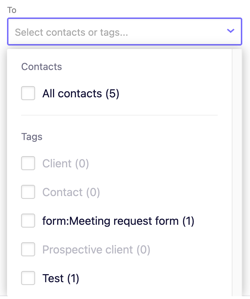
5. Under To, choose who will receive the email by selecting All contacts or applying specific tags.
Once you’ve customized your email and sent a test email, you’re ready to send it out officially.